5 Actionable Steps: How to Make Heat Press Designs for Your Business in 2026
December 31, 2025
Abstract
The creation of custom designs via heat press technology involves a systematic process beginning with digital concept generation and culminating in the permanent application of a graphic onto a substrate. This guide examines the critical stages of this process, evaluating the primary transfer methodologies: Heat Transfer Vinyl (HTV), dye-sublimation, and Direct-to-Film (DTF). It analyzes the necessary equipment, including the selection of an appropriate heat transfer machine, and the specific material requirements for each method. A detailed exploration of the operational parameters—time, temperature, and pressure—is presented, highlighting their variability across different substrates and transfer types. The document elucidates the procedural steps from design preparation and transfer production to the final pressing and curing phases. By providing a structured framework and addressing common technical challenges, this analysis serves as a comprehensive resource for both hobbyists and commercial operators aiming to achieve professional, durable, and aesthetically pleasing heat press designs.
Key Takeaways
- Begin with high-resolution digital artwork, ensuring it matches your chosen transfer method.
- Select the correct transfer type (HTV, Sublimation, DTF) based on your fabric and desired finish.
- Calibrating time, temperature, and pressure on your heat press is the most vital step.
- Mastering how to make heat press designs requires consistent testing on scrap materials first.
- Always pre-press your garment to remove moisture and wrinkles for a flawless application.
- Follow specific post-press care instructions to guarantee the longevity of the design.
Table of Contents
- Step 1: The Foundation of Design and Method Selection
- Step 2: Assembling Your Tools and Materials
- Step 3: From Digital File to Physical Transfer
- Step 4: The Art and Science of the Press
- Step 5: Finishing Touches and Long-Term Care
- Frequently Asked Questions (FAQ)
- Conclusion
- References
Step 1: The Foundation of Design and Method Selection
Before a single garment is heated or a piece of vinyl is cut, a successful project begins in the mind and on the screen. This initial phase is not merely about creating a pretty picture; it is about intentional creation, where the end product dictates the path you take. Think of yourself as an architect. You would not begin ordering bricks and mortar without a detailed blueprint, and the same principle applies here. Your design's complexity, color palette, and the very item you wish to customize will guide your hand in choosing the most suitable transfer method. This decision, made early on, will prevent wasted materials, time, and the frustration of a design that fails to meet your vision.
Brainstorming and Creating Digital Artwork
Every great custom product starts with an idea. But how do you translate that spark into a tangible digital file ready for pressing? The journey from imagination to a print-ready design is a craft in itself. Your first consideration should be the purpose of the design. Is it a bold, single-color logo for a local sports team? Or is it a full-color, photorealistic image for a commemorative t-shirt? The answer will heavily influence your choice of software and design approach.
For simple text, logos, or layered graphics, vector-based software like Adobe Illustrator or the more accessible CorelDRAW is the industry standard. The beauty of vector graphics is their infinite scalability; a design created for a small chest logo can be enlarged to fit the back of a hoodie without any loss of quality or sharpness. This is because the software defines the image using mathematical equations rather than pixels. When I first started, I tried to use a pixel-based image for a text-heavy design, and the result was a blurry, unprofessional mess. That was a lesson learned the hard way.
For photographic images or designs with complex gradients and textures, you will turn to raster-based software like Adobe Photoshop or the free alternative, GIMP. These programs work with pixels, the tiny squares of color that make up a digital image. When working with raster images, the concept of resolution is paramount. For a crisp, clear heat press design, you should always aim for a resolution of at least 300 DPI (dots per inch) at the final print size. Printing a low-resolution image downloaded from the internet will almost certainly result in a pixelated and disappointing transfer.
As you create, keep the final product in mind. Consider the color of the garment. A design with subtle, light yellow tones will disappear on a white shirt but might pop beautifully on a black one. Software tools that allow you to change the background color can be invaluable for visualizing the final result. Also, think about the "feel" of the design. Do you want something that sits on top of the fabric, like a classic vinyl print, or something that dyes the fibers themselves, leaving no texture? This question serves as a perfect bridge to selecting your transfer method.
Understanding the "Big Three" Transfer Methods
Once you have your digital blueprint, you must choose your construction materials. In the world of heat pressing, this means selecting a transfer method. While there are many niche techniques, three primary methods dominate the landscape in 2026: Heat Transfer Vinyl (HTV), Dye-Sublimation, and Direct-to-Film (DTF). Each has distinct characteristics, advantages, and limitations. Understanding them is fundamental to learning how to make heat press designs that align with your goals.
| Feature | Heat Transfer Vinyl (HTV) | Dye-Sublimation | Direct-to-Film (DTF) |
|---|---|---|---|
| Print Feel | Sits on top of the fabric; tangible layer | No feel; ink becomes part of the fabric | Soft, flexible layer on top of fabric |
| Vibrancy | Excellent for bold, solid colors | Extremely vibrant, photographic quality | Very vibrant, excellent color reproduction |
| Fabric Compatibility | Cotton, Polyester, Blends, Leather, Nylon | 100% Polyester or poly-coated items (white/light colors) | Cotton, Polyester, Blends, Dark & Light Colors |
| Durability | Very durable, but can crack over time | Permanent; will not crack, peel, or fade | Very durable, excellent stretch and washability |
| Complexity | Best for simple shapes, text, and layers | Ideal for complex, full-color images | Excellent for intricate, full-color designs |
| Initial Cost | Low (Vinyl Cutter, Heat Press) | Medium (Sublimation Printer, Ink, Paper, Heat Press) | High (DTF Printer, Powder, Film, Curing Oven, Heat Press) |
Heat Transfer Vinyl (HTV) is often the gateway for many aspiring creators. It is a polyurethane material that comes on a clear carrier sheet. You use a vinyl cutter to cut your design into the material, "weed" away the excess vinyl, and then use a heat press to activate the adhesive on the back, bonding it to the garment. Its strength lies in its versatility with fabrics and the wide array of available finishes—from matte and glossy to glitter, flock, and even puff vinyl that expands to create a 3D effect. However, it is best suited for less complex designs, as intricate details can be a nightmare to weed.
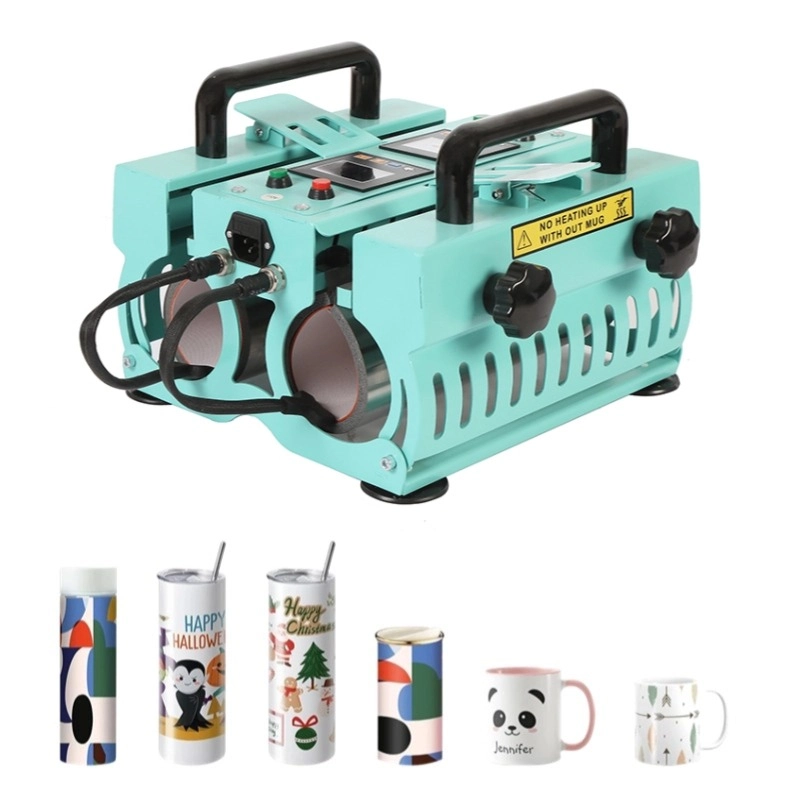
Dye-Sublimation is a magical process. Here, you print your design using special sublimation inks onto sublimation paper. When heat and pressure are applied, the ink turns into a gas and permeates the polyester fibers of the substrate. The ink becomes a part of the fabric itself. This results in a transfer with zero feel and incredible vibrancy that will never crack or peel. The major limitation? It only works on high-content polyester materials and poly-coated hard goods (like mugs or tiles), and it requires a white or very light-colored substrate, as the ink is transparent and cannot show up on dark colors. If you plan to customize items like performance sportswear or create personalized mugs with a dedicated mug press machine, sublimation is your best friend.
Direct-to-Film (DTF) is the powerful newcomer that combines the best of other worlds. This process involves printing a design with specialized water-based inks onto a clear PET film. While the ink is still wet, a powdered adhesive is applied and then melted in a curing oven or under a heat press. This creates a ready-to-press transfer that can be applied to virtually any fabric, including cotton, polyester, and blends of any color. DTF offers the full-color, intricate detail of sublimation with the fabric versatility of HTV. The feel is softer and more flexible than traditional vinyl, making it a premium choice for high-quality custom apparel.
Matching the Method to Your Product and Vision
With a clear understanding of your options, the choice becomes a logical exercise. Let's walk through a few scenarios.
Imagine you are tasked with creating jerseys for a local football team. You need names and numbers on the back. The design is simple text and digits. The jerseys are a cotton/poly blend. What is your choice? HTV is the clear winner here. It is cost-effective for simple designs, adheres well to blends, and offers the classic, bold look associated with athletic wear.
Now, consider a client who wants to sell custom mugs and mousepads featuring stunning landscape photographs. The items are specifically made for this process (poly-coated). You need vibrant, permanent, full-color images. Dye-sublimation is the only logical path. The process will embed the photograph into the mug's coating, creating a beautiful, dishwasher-safe product that will not fade.
Finally, a fashion startup approaches you. They want to print an intricate, multi-color artistic design on a line of premium black cotton t-shirts. HTV would be too difficult to weed and would feel heavy. Sublimation is impossible because the shirts are cotton and dark-colored. This is the perfect job for DTF. It will accurately reproduce the complex design and apply it to the black cotton with a soft, durable finish that matches the premium feel of the brand.
Your ability to analyze the project's requirements and select the appropriate method is the first, and perhaps most significant, step in producing a successful heat press design.
Step 2: Assembling Your Tools and Materials
Having chosen your path, it is time to gather your expedition gear. The quality of your final product is inextricably linked to the quality of your tools and materials. Skimping on a crucial piece of equipment or using subpar materials is like trying to bake a gourmet cake with a child's easy-bake oven and expired flour; the results will be disappointing, no matter how skilled the baker. This stage is about making informed investments in your craft, whether you are a hobbyist or launching a full-scale business.
Selecting the Right Heat Press Machine
The heat press is the heart of your entire operation. It is the one tool that unites all transfer methods, delivering the critical combination of heat and pressure. While a home iron can be used for some basic HTV projects, it cannot provide the consistent temperature and even pressure required for professional, long-lasting results (xTool, 2025). Investing in a quality heat transfer machine is non-negotiable for serious work.
Heat presses come in several designs, each with its own workflow benefits.
- Clamshell Presses: These are the most common and space-efficient models. The top platen opens and closes like a clamshell. They are excellent for high-volume t-shirt production due to their fast operation. However, the limited workspace can make arranging transfers on thicker items, like hoodies, a bit challenging.
- Swing-Away Presses: On these machines, the top platen swings completely away from the lower platen, providing a clear, open workspace. This design is ideal for accurately placing transfers and working with thicker substrates like plaques or tiles. The trade-off is that they require more operational space (Heat Press Nation, 2025).
- Draw Presses: A hybrid design, these function like a clamshell but allow the bottom platen to slide out like a drawer. This gives you the open workspace of a swing-away with the smaller footprint of a clamshell.
- Multifunction/Combo Presses: For those looking to diversify, a combo heat press machine is a fantastic starting point. These units come with interchangeable platens, allowing you to press not only flat items but also caps, mugs, and plates, all with a single base machine. This versatility is perfect for small businesses or crafters wanting to explore various product types without investing in multiple separate machines.
Beyond the design type, consider the platen size. A 15”x15” (38x38cm) press is a versatile standard, but if you plan on doing oversized prints or all-over designs, a larger 16”x20” (40x50cm) or 16”x24” (40x60cm) press would be a better choice. Look for models with digital time and temperature controls for accuracy and a pressure readout feature for consistency.
Gathering Your Transfer Supplies
Your heat press is ready, but what will you be pressing? The supplies you need are dictated entirely by the method you chose in Step 1.
For HTV:
- Heat Transfer Vinyl: Purchase quality vinyl from reputable brands. Cheaper vinyl often weeds poorly, has inconsistent adhesive, and cracks after a few washes. You will need a variety of colors and perhaps some specialty types like glitter, holographic, or flock to offer more options.
- Vinyl Cutter: A machine like a Silhouette Cameo, Cricut Maker, or a more professional Graphtec or Roland cutter is necessary to precisely cut your designs.
- Weeding Tools: A set of dental-pick-like tools is essential for removing the negative space from your cut vinyl.
- Teflon Sheet or Parchment Paper: This is placed between the heat platen and your transfer to protect both the garment from scorching and the platen from any residue.
For Sublimation:
- Sublimation Printer: You cannot use a standard inkjet printer. You need a printer specifically designed for or converted to use sublimation inks, such as certain models from Epson or Sawgrass.
- Sublimation Ink: These are special dyes, not standard pigments. Using the wrong ink will result in a failed transfer.
- Sublimation Paper: This paper has a special coating designed to hold the ink and then release it as a gas under heat. Regular paper will not work.
- Heat Resistant Tape: This is crucial for securing your transfer to the substrate, especially on hard goods like mugs, to prevent the image from shifting and "ghosting."
- Polyester or Poly-Coated Substrates: Remember, sublimation only bonds with polyester. This means 100% polyester shirts or items like mugs, keychains, and phone cases that have a special polymer coating.
For DTF:
- DTF Printer: This is the most significant investment. A DTF printer is a specialized piece of equipment designed to handle the specific pigment inks and print onto the film.
- DTF Inks: These are specially formulated pigment inks in CMYK and, crucially, White. The white ink layer is what allows DTF to work on dark garments.
- DTF Film: This is a PET film, typically sold in rolls or sheets, that serves as the carrier for the ink and powder.
- DTF Adhesive Powder: A fine, granular polyurethane powder that is applied to the wet ink.
- Curing Oven or Heat Press: The powder must be melted to create a smooth adhesive layer. While a dedicated curing oven is best for production, this can be done by hovering a heat press over the film.
Prepping Your Substrates
The final piece of the puzzle is the item you are decorating, known as the substrate. Proper preparation is a small step that makes a huge difference.
For all garments (t-shirts, hoodies, etc.), it is highly recommended to pre-wash them without fabric softener. This removes any chemicals or sizing from the manufacturing process that could interfere with the transfer's adhesion.
Right before pressing, always use a lint roller on the area you will be decorating. Even a tiny piece of lint or hair can get trapped under the transfer, creating a noticeable flaw, especially with sublimation where the fiber becomes permanently colored.
Finally, always pre-press your garment for 5-10 seconds. This quick press removes any residual moisture and wrinkles from the fabric, creating a perfectly smooth and dry surface that is ideal for accepting the transfer. This step is one of the most frequently skipped by beginners and one of the most common culprits for transfer failure.
With your workshop now fully equipped and your materials neatly organized, you are no longer just an architect with a plan; you are a builder ready to lay the first stone.
Step 3: From Digital File to Physical Transfer
You have a brilliant design and a workshop full of the right tools. Now comes the transformative stage where your digital creation begins its journey into the physical world. This is the moment of production, where pixels become printable, and ideas become tangible. The specific steps here diverge significantly based on your chosen method—HTV, Sublimation, or DTF. Each path has its own unique set of skills and considerations, much like a sculptor chooses between clay, stone, or wood. Mastering your chosen medium is key to a beautiful outcome.
For Heat Transfer Vinyl (HTV): The Cutting and Weeding Process
Working with HTV is a subtractive process; you start with a full sheet of material and remove everything that is not part of your design. It is a process that rewards precision and patience.
1. Setting Up the Cut: First, you will open your vector design in the software that controls your vinyl cutter. The most critical step here is to mirror your design horizontally. Think about it: you are cutting the vinyl from the back (the adhesive side), so when you flip it over to press it onto the shirt, the design needs to be in the correct orientation. Forgetting to mirror is a rite of passage for every beginner—you will likely only make this mistake once!
2. The Cut: Place your HTV sheet onto the cutter's mat with the shiny carrier sheet side down. The blade will cut through the vinyl layer but not the carrier sheet. You will need to set the correct blade depth and pressure for the specific type of vinyl you are using. Most manufacturers provide recommended settings, but a small test cut on a corner of the vinyl is always a wise move. This prevents you from ruining an entire sheet if the settings are wrong. The sound of the cutter precisely tracing your design is one of the most satisfying parts of the process.
3. Weeding: This is where your patience is truly tested. "Weeding" is the process of using a sharp, pointed tool to remove all the negative pieces of vinyl—the parts that are not in your design. For simple text or large shapes, this is quick and easy. For intricate designs with tiny details, it can be a meticulous, almost meditative task. Good lighting and a steady hand are your best friends here. Start by peeling away the large outer border, then move to the smaller internal pieces, like the insides of letters (e.g., 'o', 'a', 'p'). Once weeding is complete, you are left with your design perfectly aligned on its clear, sticky carrier sheet, ready for the press.
For Sublimation: Printing for Perfection
Sublimation is an additive process. You are adding ink to a special paper to create your transfer. The focus here is on achieving perfect color and print quality.
1. Printer and Color Settings: You must print from a sublimation printer filled with sublimation inks. In your printer's settings, you will want to select a high-quality print mode and, importantly, choose the correct paper type (often labeled as a premium matte or specialty paper setting). This tells the printer to lay down the right amount of ink.
2. The Print: Unlike HTV, you generally do not mirror your design when printing for sublimation on flat items like shirts or mousepads. The design is placed face down on the substrate, which naturally mirrors it during the transfer. However, for certain jigs or wrap-around items, mirroring might be required, so always check the instructions for your specific blank. When the print emerges from the printer, the colors will look dull and faded. Do not panic! This is completely normal. The true, vibrant colors will only be revealed once they are activated by the heat of the press. It is one of the most magical "reveals" in the customization world.
3. Trimming and Taping: Once printed, trim the excess paper around your design. This makes it easier to position and reduces the chance of getting a faint press mark from the paper's edge on your garment. For hard goods like mugs or tiles, you must securely tape the transfer to the item using heat-resistant tape. Any movement during the pressing process will cause "ghosting"—a blurry, shadowed effect that ruins the print.
For Direct-to-Film (DTF): The Print, Powder, and Cure Workflow
DTF is a multi-stage process that requires a more industrial workflow, but the result is a versatile and high-quality transfer.
1. RIP Software and Printing: You cannot simply hit "print" from a standard program. DTF printers require specialized Raster Image Processing (RIP) software. This software is what tells the printer how to lay down the layers of ink correctly. It first prints the color (CMYK) layer onto the DTF film, and then it prints a layer of white ink directly on top of the color. This white underbase is what makes the design opaque and allows it to show up on dark fabrics.
2. Powdering: This step must be done immediately after printing, while the ink is still wet. The printed film is coated with a generous layer of DTF adhesive powder. You can do this in a shallow tray, rocking the film back and forth to ensure complete coverage. Once coated, you gently tap the film to knock off all the excess powder. The powder will only stick to the wet ink of your design.
3. Curing the Transfer: The powdered film now needs to be cured. This melts the powder into a smooth, even layer of adhesive. This is ideally done in a small convection oven or a dedicated DTF curing oven at a temperature of around 160-170°C for 2-3 minutes. You can also cure by hovering your heat press platen about an inch above the film, without making contact, until the powdery finish turns into a glossy, orange-peel-like texture. Be careful not to scorch the film.
Once cured, your DTF transfer is complete. It is a dry, durable, and flexible decal that can be stored for months or pressed immediately. You have successfully transformed your digital file into a professional, ready-to-apply graphic.
Step 4: The Art and Science of the Press
This is the moment of truth. All your preparation—the design work, the material selection, the meticulous cutting or printing—has led to this point. The heat press is where the magic happens, where your transfer and your substrate become one. This process is a delicate dance between three partners: Time, Temperature, and Pressure. Getting the choreography right is the essence of how to make heat press designs that are not just beautiful, but also durable. Think of it as baking: the right oven temperature for the right amount of time is what turns dough into bread. Any deviation can lead to a burnt crust or a raw center.
Calibrating Your Heat Press: Time, Temperature, and Pressure
These three variables are the core of every heat press operation. They are not universal; they change based on the type of transfer, the fabric of the substrate, and even the brand of the materials you are using. Always start with the manufacturer's recommended settings for your specific vinyl, paper, or film. These recommendations are your baseline, your starting recipe. Keep a notebook or a digital file with the settings that work for you—it will become your most valuable resource.
Temperature: This is the heat required to activate the adhesive (for HTV and DTF) or sublimate the ink (for sublimation). Too low, and the transfer will not adhere properly and may peel off. Too high, and you risk scorching the garment, melting the vinyl, or causing the dyes in a polyester shirt to "migrate" into your transfer, discoloring it. Temperatures typically range from 135°C (275°F) for delicate nylons to over 200°C (400°F) for sublimation (xTool, 2025).
Time: This is the duration the heat and pressure are applied. It needs to be long enough for the heat to penetrate the transfer and substrate fully. Too short, and you get poor adhesion. Too long, and you can burn the item or the transfer, and in the case of HTV, the adhesive can actually be pushed out from the edges, weakening the bond. Dwell times can range from as little as 10-15 seconds for some HTVs to several minutes for sublimating ceramic mugs.
Pressure: This is the force your machine exerts. It ensures intimate contact between the transfer and the substrate, allowing the heat to do its job evenly. Pressure is usually described as light, medium, or firm.
- Light pressure is often used for delicate items or some specialty vinyls.
- Medium pressure is the most common setting, a good all-rounder for most t-shirts and HTV.
- Firm pressure is required for sublimation and some other transfers to ensure the ink fully permeates the fibers or coating. On most manual presses, you adjust pressure with a knob on top. The goal is to set it so the press closes and locks with a firm, solid effort, but without having to strain yourself.
Example Settings Chart (for reference only – always check your product's instructions):
| Transfer Type | Material | Temperature | Time | Pressure | Peel |
|---|---|---|---|---|---|
| Standard HTV | 100% Cotton | 160-165°C (320-330°F) | 15-20 sec | Medium | Hot or Cold |
| Glitter HTV | Cotton/Poly Blend | 160°C (320°F) | 15 sec | Medium-Firm | Warm |
| Sublimation | 100% Polyester T-Shirt | 200°C (390-400°F) | 45-60 sec | Medium | Hot |
| DTF Transfer | 100% Cotton (Dark) | 150-160°C (300-320°F) | 10-15 sec | Medium | Cold |
| Sublimation | Ceramic Mug (in Mug Press) | 190-200°C (375-390°F) | 180-240 sec | Firm | Hot |
This table, synthesized from data provided by manufacturers like HTVRONT (2025) and xTool (2025), illustrates the wide variation in settings. Your journey to mastery involves testing and refining these numbers for your specific equipment and materials.
The Art of Placement and Alignment
A perfectly pressed transfer can be ruined by poor placement. A crooked logo or a design that is too high or too low on a shirt looks amateurish. This is where the "art" part of the process comes in.
For t-shirts, a common rule of thumb is to place the top of the design about three to four fingers' width down from the collar. To ensure it is centered horizontally, you can fold the shirt in half and press a light crease down the middle to use as a guide. There are also specialized rulers and laser alignment systems available that can make this process faster and more accurate for high-volume work.
For a hat heat press machine, the curved platen is designed to fit the front of a cap. Your main challenge is ensuring the hat is loaded straight and the design is centered relative to the center seam of the cap. The smaller surface area leaves little room for error.
Wrapping a mug for sublimation requires precision. You must ensure the transfer is perfectly straight and pulled tightly around the mug's surface. Any gaps or loose areas will result in faded or blurry spots where the pressure was insufficient. Using heat-resistant tape is not optional here; it is a requirement.
The Pressing Action: A Step-by-Step Walkthrough
You have calibrated your machine and aligned your transfer. It is time to press.
- Power On and Preheat: Turn on your heat press and set it to the correct temperature and time. Wait for it to heat up completely. Most modern presses will beep to let you know they have reached the target temperature.
- Pre-press the Substrate: Place your garment or item on the lower platen. Press it for 5-10 seconds. This removes wrinkles and moisture, which are the enemies of a good transfer.
- Position Your Transfer: Carefully place your HTV, sublimation paper (face down), or DTF transfer onto the pre-pressed area. Use your alignment guides to get it perfect.
- Add a Cover Sheet: Place a Teflon sheet or a sheet of parchment paper over the entire design. This protects your garment from direct contact with the hot platen, preventing scorching, and it protects your platen from any inks or adhesives that might seep through.
- Engage the Press: Close the press. For a clamshell, pull the handle down until it locks. For a swing-away, swing the platen over and then lower the handle. The timer should start automatically.
- Wait and Release: Do not open the press until the timer beeps. Once it does, open the press carefully. The top platen will be extremely hot.
You have now successfully transferred your design. But the process is not quite over. The final step—the peel—is just as crucial and requires its own careful attention.
Step 5: Finishing Touches and Long-Term Care
The loud beep of the timer signals the end of the pressing, and the cloud of steam that rises as you open the press is a moment of anticipation. Your design is now on the substrate, but the final few actions will determine whether it is a masterpiece or a momentary success. This final stage is about securing the transfer, revealing its final look, and ensuring it has a long and vibrant life. It is the difference between giving someone a gift and giving them a gift with instructions on how to cherish it.
The Peel: Hot, Warm, or Cold?
After the press opens, you are left with the transfer on the garment, still covered by its carrier sheet (for HTV and DTF) or the paper (for sublimation). How and when you remove this carrier is a critical, time-sensitive decision. The terms "hot peel," "warm peel," and "cold peel" refer to the temperature of the item when you peel away the carrier. The correct method is dictated by the specific product you are using, and getting it wrong can ruin the transfer.
- Hot Peel: This means you must peel the carrier sheet off immediately after the press opens, while the garment is still smoking hot. Many standard HTVs and sublimation papers are hot peel. The process needs to be swift and confident. Peeling too slowly can cause issues. For sublimation, this removes the paper before the ink has a chance to turn back into a solid and potentially re-gas, which could cause ghosting. For some HTVs, a hot peel results in a softer, more matte finish as the vinyl settles into the fabric weave.
- Warm Peel: This requires a short waiting period, perhaps 5-10 seconds after the press opens. The item is no longer scorching but is still very warm to the touch. Certain specialty vinyls use this method to allow the adhesive to set just enough before the carrier is removed.
- Cold Peel: This is the most patient method. You must wait until the garment and transfer are completely cool to the touch before peeling. This can take 30 seconds to a minute or longer. Many DTF transfers and specialty HTVs like holographic or foil vinyl are cold peel. Peeling a cold-peel transfer while it is still hot will likely pull the design right off the shirt or leave behind a sticky, incomplete mess. The adhesive needs to cool and fully bond with the fabric fibers before the carrier is released. When you do peel a cold-peel DTF transfer, it should come off smoothly with a satisfying, crisp sound, revealing a perfect design underneath.
Always check your material's instructions. If you are unsure, a cold peel is often a safer bet to test on a scrap piece, as peeling hot when you should have peeled cold is usually more disastrous than the reverse.
Post-Pressing and Curing
For some transfers, the process is complete after the peel. For others, an extra step can enhance durability and finish.
With DTF, for example, it is a common best practice to perform a quick "post-press" for 5-10 seconds after the cold peel. You cover the naked design with a Teflon or parchment sheet and press it again. This helps to further embed the design into the fabric, improving washability and giving it a more pleasing matte finish, reducing the initial plasticky shine.
Regardless of the method, the real "curing" happens in the 24-48 hours after pressing. The adhesives and inks need time to fully set and bond with the garment. This is why the first rule of aftercare is patience.
Care Instructions for Longevity
You have poured your time, effort, and creativity into this custom item. The final step is to educate its new owner on how to care for it. Providing clear care instructions with your products is a mark of professionalism and ensures customer satisfaction. A design that peels or fades after one wash is a reflection on you, the creator.
Here are the universal rules for washing heat-pressed garments:
- Wait 24-48 Hours Before the First Wash: This is the most important rule. It allows the transfer to fully cure.
- Turn the Garment Inside Out: This protects the design from abrasion from other clothes, zippers, and the washing machine drum itself.
- Wash in Cold Water: Hot water can soften adhesives and cause colors to fade. Use a mild detergent.
- Tumble Dry on Low or Hang Dry: High heat is the enemy of heat-applied graphics. The intense heat of a dryer can crack or peel the design over time. Hanging the garment to dry is the safest method.
- Do Not Use Bleach or Fabric Softener: Bleach will destroy the colors, and fabric softeners can degrade the adhesive.
- Do Not Iron Directly on the Design: If you must iron the garment, turn it inside out and use a low heat setting, avoiding the decorated area.
By following these simple steps, a quality heat press design can last for 50 washes or more, often outliving the garment itself. Your job as a creator is not just to make the design, but to ensure it endures, carrying your mark of quality long after it has left your workshop.
Frequently Asked Questions (FAQ)
Why is my heat transfer vinyl (HTV) peeling off after washing?
This is one of the most common issues for beginners. The cause is almost always one of three things: insufficient pressure, incorrect temperature, or not enough time. Ensure your heat press is calibrated to the vinyl manufacturer's specifications. Also, remember to pre-press the garment to remove moisture and wait 24-48 hours after pressing before the first wash to allow the adhesive to fully cure.
Can I use a regular home iron instead of a heat press?
While you can technically apply some types of HTV with a home iron for small hobby projects, it is not recommended for any professional or long-lasting application. An iron cannot provide the consistent, even temperature across its surface, nor can it deliver the firm, measurable pressure that a heat press can (xTool, 2025). This leads to transfers that peel, crack, or have uneven adhesion. Sublimation and DTF are impossible with an iron.
What is the main difference between sublimation and DTF printing?
The key difference lies in fabric compatibility and how the ink works. Sublimation ink turns into a gas and dyes the fibers, so it only works on white or light-colored 100% polyester fabrics and leaves no feel. DTF uses pigment ink printed onto a film with an adhesive backing, creating a physical transfer that sits on top of the fabric. This allows DTF to work on cotton, polyester, blends, and fabrics of any color, including black.
How do I prevent the square outline of my heat press from showing on the garment?
This "press box" or scorching is usually caused by too much pressure or too high a temperature for the specific fabric. First, reduce your pressure to the minimum required for a successful transfer. Using a Teflon pillow or a foam pad inside the shirt can also help by raising the print area, so the edges of the platen do not make firm contact with the surrounding fabric. Finally, ensure your temperature is not too high for the material, especially with heat-sensitive polyester.
What resolution should my artwork be for a high-quality print?
For any heat press design that involves printing (like sublimation or DTF), your digital artwork should have a resolution of at least 300 DPI (dots per inch) at the intended final size. Using a low-resolution image, like one saved from a website, will result in a blurry, pixelated, and unprofessional-looking final product. Always start with the highest quality source file possible.
Conclusion
The journey of learning how to make heat press designs is a rewarding exploration of creativity and technical skill. It begins not with the heat of the press, but with the spark of an idea, carefully translated into a digital format. We have seen how the path then branches, guided by the choice between the bold simplicity of Heat Transfer Vinyl, the vibrant permanence of Dye-Sublimation, or the versatile power of Direct-to-Film. Each method demands its own set of tools, materials, and unique workflow, from the patient weeding of vinyl to the precise powdering of a DTF transfer.
The heart of the process, the press itself, is a science of its own—a careful balance of time, temperature, and pressure, calibrated for each specific task. Success is found in the details: the pre-press that removes hidden moisture, the careful alignment that centers the design, and the crucial decision of when to peel. By understanding and mastering these stages, from initial concept to final aftercare, you transform from a simple operator into a true artisan. The finished product—be it a t-shirt, a cap, or a mug—is more than just an object; it is a tangible piece of your craft, ready to be worn, used, and enjoyed for years to come.
References
Heat Press Nation. (2025). Heat press 101. Retrieved from
HTVRONT. (2025). The ultimate guide to HTVRONT heat press settings (2025 edition). Retrieved from https://www.htvront.com/en-gb/blogs/tutorials/heat-press-settings
Microtec. (2025). Frequently asked questions. Retrieved from
Offnova. (2023). What exactly is a heat press machine?. Retrieved from https://offnova.com/blogs/news/what-exactly-is-a-heat-press-machine
Ricoma. (2025). Heat presses buyer's guide. Retrieved from
xTool. (2025). Heat transfer printing: Types & process explained. Retrieved from
xTool. (2025). The ultimate guide to HTV heat press settings. Retrieved from https://www.xtool.com/blogs/xtool-academy/htv-heat-press-settings