How to Use Cricut Mug Press with Sublimation for Consistent, High-Quality Production?
marzo 25, 2026
Understanding how to use Cricut Mug Press with sublimation is essential for businesses aiming to deliver consistent, high-quality customized drinkware at scale. The process involves preparing sublimation designs, correctly wrapping them onto compatible mugs, and applying controlled heat and pressure using a mug press to permanently transfer the image. When executed properly, this method produces vibrant, durable prints that are resistant to fading, peeling, or cracking. For B2B buyers and production managers, mastering this workflow is not just about aesthetics but about ensuring repeatability, efficiency, and product quality across batches.
This article provides a structured, production-oriented guide to sublimation mug printing, helping decision-makers optimize workflows and evaluate equipment for commercial use.
What Is Sublimation Mug Printing and How Does It Work?
Sublimation is a heat transfer process where solid dye transforms directly into gas without passing through a liquid phase. When exposed to high temperature and pressure, sublimation ink penetrates the polymer coating of a mug and becomes embedded within the surface.
This results in a print that is not just applied to the surface but becomes part of the material itself. Compared to traditional printing methods, sublimation offers superior durability and color vibrancy.
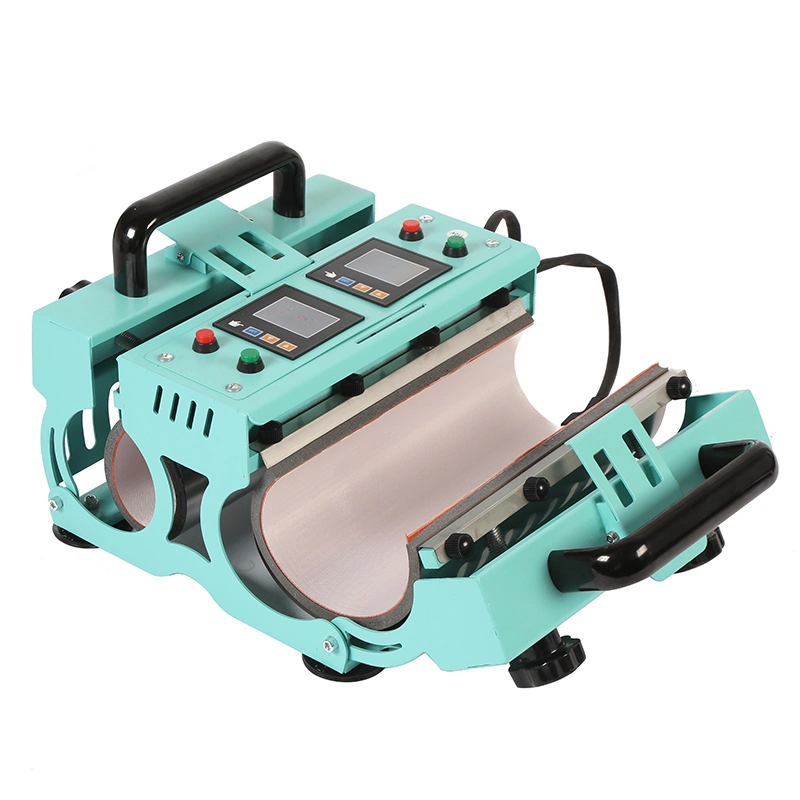
The Cricut Mug Press is designed for small-scale and semi-commercial applications, automating temperature and pressure control. However, for higher production volumes, businesses often transition to industrial-grade solutions such as a Cup Press Machine to improve efficiency and scalability.
Step-by-Step Process: How to Use Cricut Mug Press with Sublimation
A standardized workflow is critical for achieving consistent results.
Step 1: Design Preparation
Create your artwork using design software such as Adobe Illustrator or Cricut Design Space. Ensure that:
- The design is mirrored before printing
- Resolution is at least 300 DPI
- Colors are optimized for sublimation printing
Step 2: Printing the Sublimation Transfer
Use a sublimation printer with compatible ink and paper. Print the mirrored design onto sublimation transfer paper.
Proper color management and printer calibration are essential to ensure accurate output.
Step 3: Preparing the Mug
Only polymer-coated sublimation mugs are suitable for this process. Clean the mug surface thoroughly to remove dust, तेल, or fingerprints.
Wrap the printed transfer tightly around the mug and secure it with heat-resistant tape to prevent shifting during pressing.
Step 4: Heat Press Application
Insert the mug into the Cricut Mug Press. The machine automatically applies the required heat and pressure.
Typical parameters include:
- Temperature: approximately 180–200°C
- Time: 4–6 minutes
The exact settings may vary depending on mug type and transfer material.
Step 5: Cooling and Finishing
After pressing, remove the mug carefully using heat-resistant gloves. Allow it to cool before removing the transfer paper.
The final result should display sharp, vibrant colors with no ghosting or fading.
Key Factors That Affect Sublimation Quality
Achieving consistent output requires control over several variables.
Temperature and Time
Insufficient heat or time results in incomplete transfer, while excessive heat can cause color distortion or ghosting.
Pressure Consistency
Uniform pressure ensures even ink transfer. Inconsistent pressure can lead to uneven coloration or blurred edges.
Material Compatibility
Only mugs with proper sublimation coatings will produce high-quality results. Using incompatible materials leads to poor adhesion and fading.
Workflow Standardization
For businesses, repeatability is key. Documenting and standardizing each step ensures consistent output across operators and production batches.
For scaling operations, investing in a Máquina de prensado térmico de tazas provides greater control and higher throughput compared to entry-level equipment.
Common Issues and Troubleshooting in Sublimation Mug Pressing
Even with proper setup, issues can arise during production.
Ghosting
Ghosting occurs when the transfer paper shifts during pressing. This can be prevented by securing the paper tightly and minimizing movement.
Faded Colors
Faded prints are usually caused by insufficient temperature or time. Verifying machine calibration is essential.
Uneven Transfer
This issue often results from inconsistent pressure or improper mug placement within the press.
Burn Marks
Overheating can cause discoloration or burn marks on the mug surface. Adjusting temperature and time settings helps prevent this.
Contact our experts to optimize your mug sublimation production setup
Comparison: Cricut Mug Press vs Industrial Mug Press Machines
| Característica | Cricut Mug Press | Industrial Mug Press Machine |
|---|---|---|
| Production Capacity | Low to medium | Medium to high |
| Automation Level | High (preset controls) | Adjustable and customizable |
| Flexibilidad | Limited mug sizes | Multiple sizes and shapes |
| लागत Efficiency | Suitable for small batches | Optimized for mass production |
| Control Over Parameters | Limitado | Full control |
Table 1: Comparison of mug press equipment for different production needs
This comparison highlights why businesses often upgrade equipment as production demands increase.
Scaling Sublimation Mug Production for Commercial Use
Transitioning from small-scale to industrial production requires strategic planning.
Equipment Upgrade
While Cricut Mug Press is suitable for entry-level production, high-volume operations benefit from industrial-grade systems such as a Prensa térmica para tazas, which offer better durability and efficiency.
Process Optimization
Standardizing workflows, training operators, and implementing quality control measures are essential for maintaining consistency.
Supply Chain Management
Reliable sourcing of sublimation blanks, inks, and transfer materials ensures uninterrupted production.
Quality Assurance
Implementing inspection protocols helps identify defects early and maintain product standards.
FAQ: How to Use Cricut Mug Press with Sublimation
Can I use any mug for sublimation?
No, only mugs with a polymer coating designed for sublimation will produce high-quality results.
What temperature should I use for sublimation?
Typically between 180°C and 200°C, depending on the mug and transfer material.
Why is my design not transferring بالكامل?
This may be due to insufficient heat, time, or pressure. Checking machine settings and calibration is recommended.
Is Cricut Mug Press suitable for commercial production?
It is suitable for small-scale operations, but larger businesses should consider industrial equipment for efficiency.
How can I improve color vibrancy?
Ensure proper color management, use high-quality sublimation ink, and maintain correct temperature and pressure settings.
About Taile
Taile is a professional heat press machine supplier dedicated to providing reliable and high-performance solutions for global customization businesses. With a focus on innovation, durability, and user-friendly design, Taile offers a comprehensive range of equipment tailored for both small-scale creators and large-scale manufacturers. By combining advanced engineering with practical production insights, Taile helps clients achieve consistent quality and efficient workflows in sublimation printing.
Reference