.png)
.png)

How to Use Cricut Mug Press for Efficient Mug Production in Custom Printing Businesses?
Marzo 5, 2026
Understanding how to use Cricut Mug Press is essential for businesses entering the custom drinkware market. The process is relatively simple: design preparation, mug preparation, transfer positioning, pressing, and cooling. When performed correctly, it produces durable, dishwasher-safe graphics that are permanently bonded to the mug surface through heat transfer technology.
For custom printing businesses, mastering this workflow allows consistent quality and scalable production. Whether you operate a small personalization shop or a growing promotional product company, the mug heat transfer process can be integrated into a broader production workflow that includes design software, sublimation printers, and automated heat press systems.
In this article, we will explain the complete operational workflow, key parameters, common mistakes, and practical production tips. These insights help printing professionals, distributors, and equipment buyers understand how mug press technology fits into commercial customization operations.
What Is a Cricut Mug Press and How Does It Work?
A Cricut Mug Press is a specialized heat transfer device designed for sublimation printing on coated ceramic mugs. It uses controlled heat and pressure to permanently transfer sublimation ink from printed paper onto the mug surface.
The machine works through a thermal process where sublimation ink transforms from solid to gas under high temperature. The gaseous ink penetrates the polymer coating of the mug and bonds with it. Once cooled, the image becomes part of the mug’s surface rather than a layer on top.
From a production standpoint, this method offers several advantages:
- Permanent prints that resist fading or peeling
- Dishwasher and microwave safe results
- Smooth, professional-quality graphics
- Repeatable production process
For businesses evaluating scalable solutions, advanced equipment such as a mug and tumbler heat press can support larger product sizes and higher throughput compared with entry-level consumer devices.
Step-by-Step Guide: How to Use Cricut Mug Press
The operational workflow of a mug press is straightforward but requires attention to detail to ensure consistent product quality.
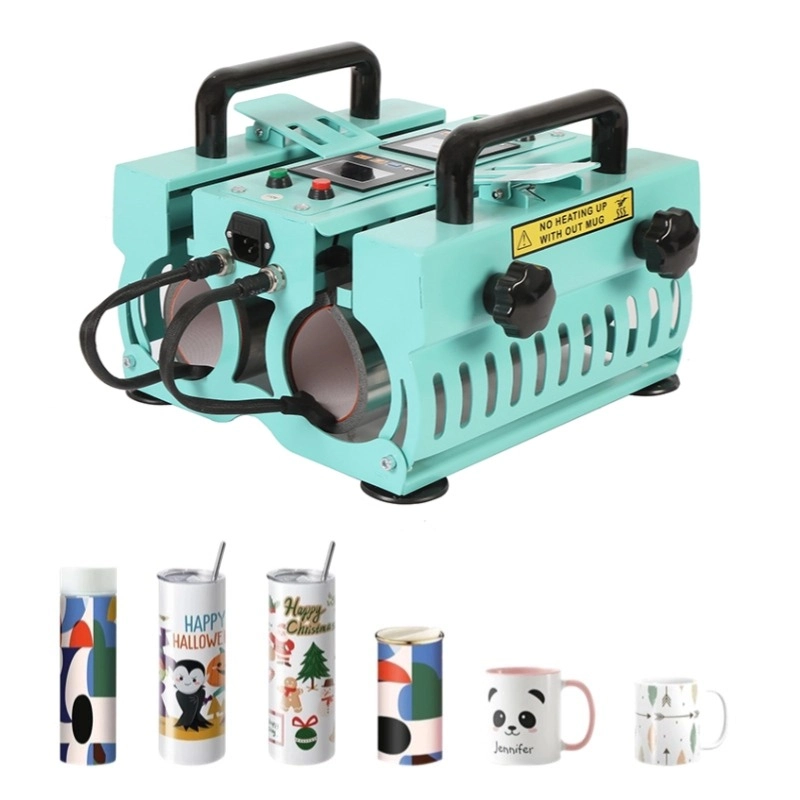
Step 1: Create and Print the Design
The first step is designing the artwork using compatible design software. The design should match the mug dimensions and avoid areas close to the handle.
Once the design is finalized:
- Mirror the artwork for sublimation transfer
- Print using sublimation ink on transfer paper
- Allow the print to dry completely
Accurate printing is critical because sublimation ink reacts differently under heat compared with traditional inkjet inks.
Step 2: Prepare the Mug Surface
Before applying the design, the mug must be cleaned and prepared.
Important preparation steps include:
- Wipe the mug with lint-free cloth
- Remove dust or fingerprints
- Ensure the mug has a sublimation coating
Any contamination on the mug surface may result in color distortion or uneven transfers.
Step 3: Attach the Sublimation Transfer
The printed design is wrapped around the mug and secured using heat-resistant tape.
Key considerations:
- Align the design evenly
- Ensure tight contact with the mug surface
- Avoid wrinkles or air gaps
A poorly aligned transfer will lead to blurred or distorted images.
Step 4: Press the Mug
Insert the prepared mug into the mug press. The machine automatically applies heat and pressure.
Typical operational characteristics include:
- Automatic temperature control
- Pre-set press cycle
- Uniform heat distribution
During this stage, the sublimation ink transitions into gas and bonds with the mug coating.
Step 5: Cooling and Finishing
After pressing, remove the mug carefully using heat-resistant gloves.
Allow the mug to cool naturally before removing the transfer paper. Premature removal may cause ghosting or image shifting.
Once cooled, the mug is ready for packaging or further quality inspection.
Key Parameters for High-Quality Mug Heat Transfers
Successful mug pressing depends on maintaining correct heat transfer parameters. Different mugs and coatings may require adjustments.
Table: Typical Mug Press Operating Parameters
| Parametro | Typical Range | Notes |
|---|---|---|
| Temperature | 180–200°C | Depends on mug coating |
| Press Time | 180–300 seconds | Larger mugs may require longer time |
| Pressure | Medium to firm | Ensures proper ink penetration |
| Cooling Time | 5–10 minutes | Prevents image distortion |
For commercial production environments, these settings may be optimized through testing to balance production speed and transfer quality.
Common Mistakes When Using a Mug Press
Even experienced operators occasionally encounter issues during mug pressing. Understanding common mistakes can help prevent costly product waste.
Misaligned Designs
Improper alignment leads to crooked graphics or uneven spacing around the mug. Always measure the printable area before printing.
Ghosting Effects
Ghosting occurs when the transfer paper shifts during pressing. This results in duplicate or blurred outlines.
Preventive measures include:
- Secure tape placement
- Firm pressure
- Careful paper removal after cooling
Incorrect Temperature Settings
Too much heat can cause color bleeding, while insufficient heat may produce faded prints.
Poor Mug Coating
Low-quality mugs may not have a proper sublimation coating, leading to dull or inconsistent prints.
For manufacturers focusing on expanded drinkware product lines, professional equipment supporting reliable heat transfer for mugs can significantly improve productivity and product consistency. Advanced systems designed for trasferimento di calore per tazze allow businesses to handle both mugs and larger tumblers within a unified workflow.
Scaling Mug Press Production for Custom Printing Businesses
As demand for personalized drinkware grows, many companies are transitioning from manual workflows to semi-automated production.
Several factors influence scalability:
Production Efficiency
Commercial mug presses can process multiple mugs simultaneously, increasing output per hour.
Product Diversification
Businesses can expand beyond standard mugs to include:
- Travel tumblers
- Stainless steel cups
- Promotional drinkware
- Corporate branded merchandise
Workflow Integration
Professional production environments integrate mug presses with:
- sublimation printing systems
- design software automation
- packaging and labeling lines
These integrations reduce labor costs and ensure consistent product quality.
If you are evaluating mug press solutions for your customization business, you can explore equipment options or request professional guidance through this contact page:
https://www.tlheatpress.com/contact-us/
Equipment Considerations for Professional Mug Press Buyers
Decision makers evaluating mug press equipment should consider several technical and operational factors.
Heating Uniformity
Consistent temperature distribution ensures that prints appear evenly across the mug surface.
Compatibility with Different Mug Sizes
Modern heat presses often support interchangeable heating elements for multiple mug sizes.
Automation Features
Advanced equipment may include:
- digital temperature control
- timer automation
- pressure adjustment systems
These features reduce operator error and improve production repeatability.
Durability and Maintenance
Industrial mug presses should be built with durable heating elements and easy-to-maintain mechanical components.
Businesses purchasing equipment for high-volume production often prioritize reliability, energy efficiency, and long service life.
FAQ
Is Cricut Mug Press suitable for commercial production?
Cricut Mug Press is primarily designed for small-scale customization. However, commercial businesses typically require larger capacity heat presses to increase production efficiency.
What type of mugs work with sublimation mug presses?
Only mugs with a polymer sublimation coating are suitable. Standard ceramic mugs without coating will not absorb sublimation ink properly.
How long does the mug pressing process take?
Most mug press cycles take between 3 and 5 minutes, depending on temperature settings and mug size.
Can mug presses print full-wrap designs?
Yes. With proper alignment and design layout, mug presses can produce full-wrap graphics around the mug body.
Why do mug transfers sometimes appear faded?
Faded transfers are usually caused by insufficient temperature, low pressure, or poor sublimation coating on the mug.
About Taile
Taile is a professional mug press supplier specializing in heat transfer equipment for custom printing businesses worldwide. The company provides reliable mug presses, tumbler presses, and integrated heat transfer solutions designed for durability, precision, and high productivity. With strong manufacturing capabilities and continuous technology innovation, Taile supports distributors, customization studios, and promotional product manufacturers seeking scalable drinkware printing equipment.
Riferimenti
- Wikipedia – Dye-sublimation printing
https://en.wikipedia.org/wiki/Dye-sublimation_printing - ScienceDirect – Sublimation heat transfer technology
https://www.sciencedirect.com/topics/engineering/sublimation-printing